
*YOU'LL BE PROMPTED TO COMPLETE AN ONBOARDING CALL ONCE COMPLETING ALL VIDEOS
CRM DONE BETTER
© 2026
Start Here: 07. Setup: Phones


ABOUT THIS LESSON:
Setup: Phones (For LLC, S-Corp, C-Corp)
By completing the form below, I affirm that I have met the following requirements:
I have established an incorporated business with an active EIN (Employer Identification Number).
I maintain a live website.
My website prominently displays my legal business name, including any Doing Business As (DBA) and Limited Liability Company (LLC) designations, if applicable.
Any forms on my website that collect phone numbers include a consent checkbox.
I have made my active contact information publicly accessible on my website.
My Website has Terms & Conditions added.
Setup: Phones (For Sole Proprietors) click for update
If you’re registering as a Sole Proprietor — meaning you don’t have an Employer Identification Number (EIN) — you need to complete the phone registration yourself.
There is a quick identity check before your messaging campaign can go live as part of a new requirement to help keep the messaging system safe and trusted.
🛠️ What You’ll Do During Registration:
Fill out your business details - This includes your name, address, and campaign purpose.
Finish your campaign setup - Add info about what kind of messages you’ll be sending.
Identity Verification (this is new and required) - Before submitting, you’ll be prompted to verify your identity. The process takes just a few minutes and happens right in the signup flow.
📸 What the Identity Check Looks Like:
A. Take a quick selfie video — just follow the prompts with a few head movements.
B. Upload or snap a photo of a government-issued ID — like your driver’s license or passport.
Results are instant. If everything checks out, your campaign moves forward without delay.
A2P Registration Checklist
Legal Business Name - EXACT Name on EIN Form commas, spaces. Periods required
EIN - If you don’t have an EIN, then register them as a business without tax ID
Business Type - LLC/Corp/Sole Proprietor
Website URL - preferably hosted on a domain that aligns with your business name for verification purposes.
Registered Business Address - EXACT Address on EIN Form
Business Industry Type
Business Region of Operations
Business Email - ideally under the same website domain
Terms and Conditions and Privacy Policy - this must be present in your website footer and in your intake forms
Step-by-Step Guide
Step 1. Go to Settings > Phone Numbers > Trust center tab to begin the A2P Registration.
Step 2. Fill out the Business Details based on the Client’s Business Profile.
Step 3. For Brand Details, choose Low Volume Standard.
Step 4. Customize Campaign Details:
Use Case Description Sample:
This campaign sends appointment information - confirmation & reminder messages to customers once they have booked an appointment with [LEGAL BUSINESS NAME] on our page and opted-in to receive promotional and notification SMS.
Sample Message #1
Hi John! This is [OWNER’S FIRST NAME] from [LEGAL BUSINESS NAME]. Our appointment for July 20 at 11:00 AM is confirmed. Reply STOP to unsubscribe.
Sample Message #2
Hello, this is [OWNER’S FIRST NAME] from [LEGAL BUSINESS NAME]. We are confirming your appointment tomorrow at 9 am. Reply STOP to cancel.
User Consent:
How do lead/contacts consent to receive messages?
End users opt-in by visiting [Contact Us Page Link or Calendar Page Link with a COMPLIANT FORM - see example below] and filling in their details. Users check a box to receive notifications & promotional messages to provide their consent.
Opt-in Message
You have successfully opted-in to receive notification and promotional SMS from [LEGAL BUSINESS NAME]. Please reply STOP if you need to opt out in the future.
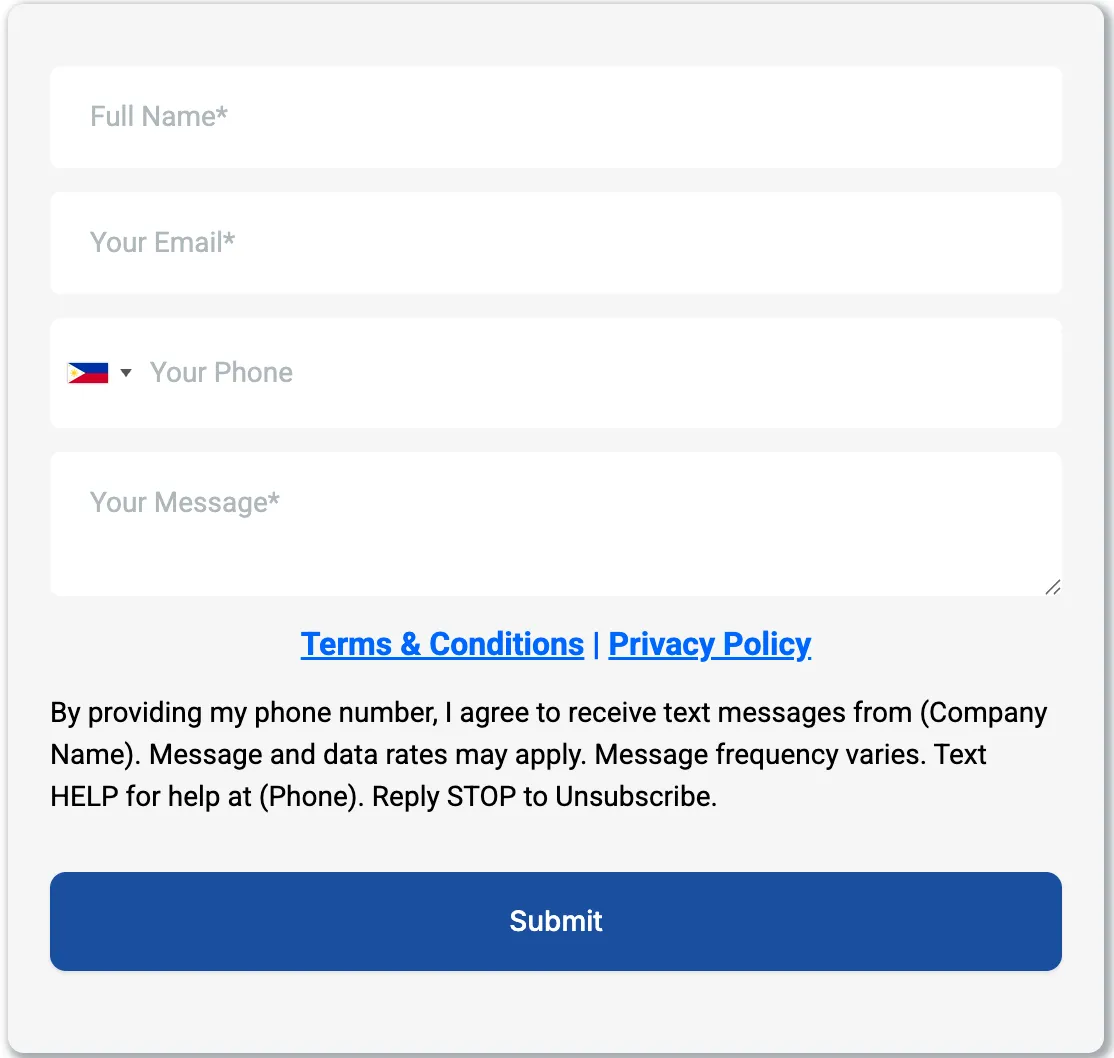
What is a Compliant Form?
The form must have the following elements to be compliant:
Messaging consent must ALWAYS be optional. Check boxes cannot be pre-selected or pre-checked.
Opt-in consent message and checkbox must be separated from the Privacy Policy | Terms of Service consent and check box.
You need to include the bolded part like:
The type of messaging you are sending and the business/brand name
Message delivery frequency or recurring messages disclosure ("4 messages per month", "Message frequency varies", "1 message per login", etc)
Fee disclosure: "Message and data rates may apply"
Customer care information (typically "Text HELP for help" or Help at XXX-XXX-XXXX)
Opt out instructions (typically "Text STOP to cancel")
EXAMPLE:
I Consent to Receive SMS Notifications & Alerts from Business Done Better. Message frequency varies. Message & data rates may apply. Text HELP to (561) 944-9929 for assistance. You can reply STOP to unsubscribe at any time.
Important SMS Compliance Update
Effective September 1, 2025, there's a major changes to how SMS (and MMS) messaging is regulated.
All businesses making sales calls or sending texts into or from Texas must now comply with the new Registration requirement.
Unless exempt, businesses must file Form 3401 with the Secretary of State, pay a $200 annual fee, and post a $10,000 bond to legally send marketing texts to Texas residents. Additionally, Businesses cannot send marketing texts before 9 a.m. or after 9 p.m. Monday–Saturday, or before noon on Sundays.
Click Here to Access Step‑by‑Step Registration & Bond Procedure
Note: We recommend everyone to follow through the guidelines even if you're not sending marketing sms into or from Texas.
USER DETAILS:
Name:
Email:
Phone:
Your Onboarding Progress:
..... >> NOTES:
..... >> NOTES:
..... >> NOTES:
..... >> NOTES:
..... >> NOTES:
..... >> NOTES:
..... >> NOTES:
..... >> NOTES:
..... >> NOTES:
10. Setup: Connect Social Channels
..... >> NOTES:
11. Setup: Essential Customization
..... >> NOTES:
..... >> NOTES:
..... >> NOTES:
14. Quick Account Template Overview
..... >> NOTES:
..... >> NOTES:
..... >> NOTES:
17. Deep Dive: CRM Feature Overview
..... >> NOTES:
18. Deep Dive: Template Overview
..... >> NOTES:
..... >> NOTES:
20. Create Your Affiliate Link
..... >> NOTES: